
Role: Developer, Designer & Consultant
Status: Active (v2.0)
Type: Desktop Productivity Tool (Python + tkinter GUI)
Project Motivation
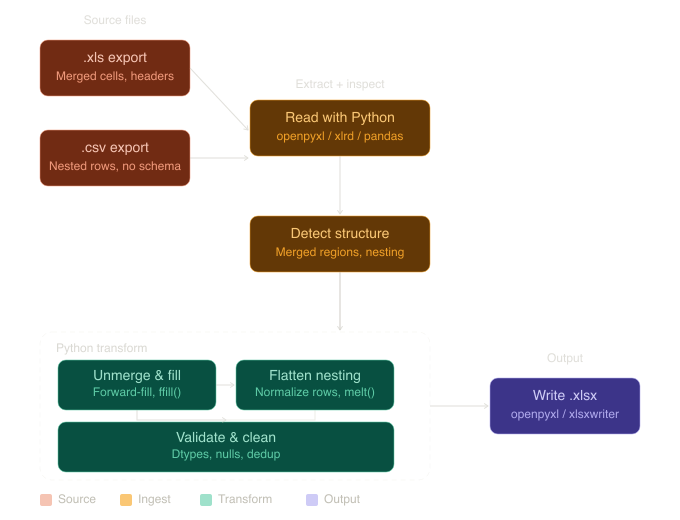
A colleague’s ERP reporting workflow required manual data cleaning that was time-consuming, error-prone, and dependent on institutional knowledge held by a single employee. The process involved reading raw exports from the ERP system, standardizing inconsistent formatting, validating field accuracy, and producing clean outputs ready for reporting. Without automation, the workflow could not be delegated or scaled, creating a recurring bottleneck and organizational risk.
Development Journey:
Requirements & Consultation
- Conducted discovery sessions with the workflow owner to document the full data cleaning process, validation requirements, and edge cases before writing any code
- Identified that the solution needed a graphical interface so the colleague could operate and teach it to others without Python knowledge
- Designed the workflow logic collaboratively so the end user had direct input into the interface and process prior to implementation
Application & Interface Design
- Built a tkinter GUI that presents a simple, guided interface for loading source files, running cleaning logic, and exporting standardized outputs
- Implemented file reading and writing pipelines supporting Excel and CSV formats using openpyxl and the csv module
- Applied data validation and standardization logic to detect inconsistencies, enforce formatting rules, and flag anomalous entries before they reach downstream reporting
ETL Pipeline Design
- Designed the extract, transform, and load pipeline to handle the specific structural quirks of the ERP exports, including inconsistent delimiters, mixed data types, and irregular column ordering
- Built the transformation layer to be configurable so future changes to ERP output formats could be accommodated without rewriting core logic
- Ensured output files matched the exact format required for downstream reporting tools, eliminating manual reformatting steps entirely
v2.0 User-Driven Feature Expansion
- Received a feature request from the workflow owner after initial deployment: the ERP system produces two structurally different report types requiring distinct cleaning logic
- Extended the application to prompt the user at launch to identify which report type they are processing, routing the input through the appropriate transformation pipeline automatically
- Added batch processing capability allowing the user to select and process a collection of files in a single operation rather than one file at a time
- Both additions were driven directly by real user feedback gathered after deployment, reflecting an iterative product development cycle
Enablement & Handoff
- Delivered both versions with updated user documentation so the colleague could train new users independently
- Designed the interface to remain self-explanatory for non-technical users across both versions
- Structured the codebase with inline comments so future modifications could be made without the original developer
Skills Demonstrated
- Requirements gathering and end-user consultation prior to development
- Python application development with tkinter GUI design
- ETL pipeline design for Excel and CSV data sources
- Data validation and anomaly detection logic
- openpyxl and CSV file reading and writing
- Iterative product development driven by real user feedback
- Batch file processing and multi-pipeline routing logic
- End-user enablement and documentation for non-technical audiences
- Self-service workflow design enabling delegation and training